What Trade Journal Pro EA does
Trade Journal Pro is a lightweight Meta Trader EA that auto-journals every MT4/MT5 trade. It captures execution data (symbol, direction, lot size, entry/exit price & time, SL/TP, net P/L) and saves chart screenshots at entry and close. You get an accurate, searchable history without typing—and the visual context to understand why a trade worked or failed.
Who it’s for
-
Manual traders who skip journaling because it’s slow
-
EA users who want clean, auditable logs
-
Funded-account and prop traders who need consistent records
-
Coaches/mentors reviewing students’ trades with screenshots
What gets recorded (fields)
-
Trade metadata: symbol, ticket, direction, lot size
-
Entry/exit price & time, SL/TP, commission, swap, net P/L
-
Screenshots: time-stamped chart images on open/close
-
Optional tags: strategy, session, market condition, custom notes
Workflow (3 steps)
-
Attach the EA to one chart in MT4/MT5 (any pair).
-
Trade normally (manual or with other EAs).
-
Review & export: filter by date/pair/strategy and export CSV/Excel for deeper analysis.
Why screenshots matter
Performance stats tell you what happened; screenshots show the market context—trend, structure, news spikes, and execution quality—so you can refine entry rules, avoid low-probability conditions, and build a reliable playbook.

Analysis ideas you can run weekly
-
Pair heatmap: Which symbols deliver the best expectancy?
-
Session review: London vs. New York performance with screenshots
-
Strategy filter: Keep only tags with positive R-multiple
-
Error audit: Find slippage/outliers and update risk rules

Compatibility & requirements
-
Platforms: MetaTrader 4 and MetaTrader 5
-
Operating systems: Windows, macOS (supported MT builds)
-
Minimum: Windows 10+ or macOS 12+, stable internet
-
Accounts: Hedging and netting supported
-
Excel 2016+ (or compatible) recommended for the workbook reports FXToolskit
Performance & storage
-
Optimized screenshot size to keep terminals responsive
-
Local file organization by date/ticket for easy backup
-
CSV/Excel export for spreadsheets or BI dashboards
What’s included (bundle)
-
Trade Journal Pro EA for MT4/MT5 — automatic CSV + entry/exit screenshots (no manual typing).
-
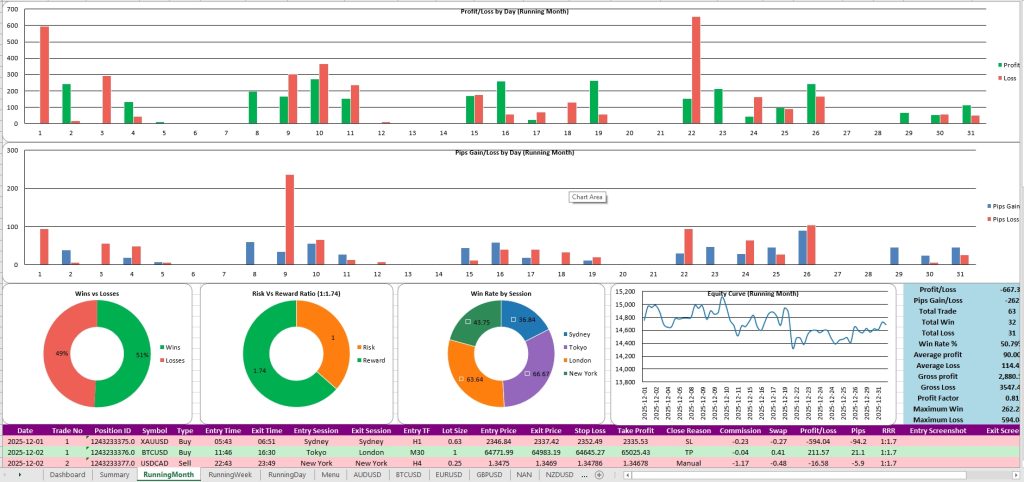
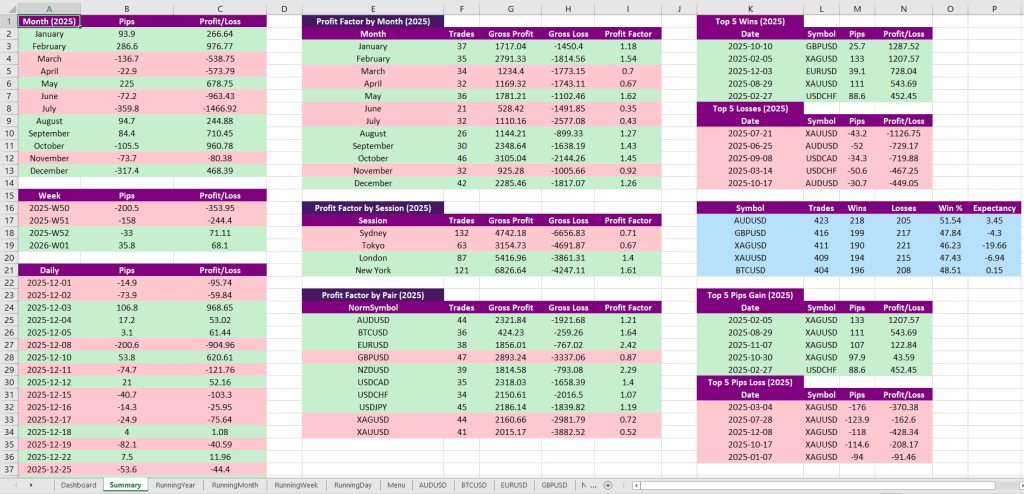
Trade Journal Pro Analyzer for Windows & macOS — dashboards, tables, equity curve, time heatmaps, symbol scorecards, filters, and cashflow view.
-
Quick Start Guide + Video Tutorial to set up EA + Analyzer. FXToolskit
Analyzer highlights
-
KPIs at a glance (win rate, profitability, drawdown, balances)
-
Full trade table with links to screenshots for fast context
-
Powerful filters (symbol, session, weekday, timeframe, direction, period)
-
Profit factor by symbol/session/period; weekly/monthly/yearly views
-
Equity curve & distribution views; cashflow (deposits/withdrawals) FXToolskit

Changelog
-
v1.0 — Initial release: auto screenshots (open/close), CSV export, tags/filters.
FAQ
Does it log trades from other EAs?
Yes. Attach Trade Journal Pro EA to one chart; it logs any orders executed in that terminal—manual or automated.
Can I control screenshot size/frequency?
Yes. Choose image size and whether to save entry, exit, or both to balance detail and storage.
Will it slow down MetaTrader?
No—image generation is optimized. Keep reasonable image dimensions and clear old screenshots periodically if disk space is tight.
How do I review the data?
Use the built-in filters and export CSV/Excel to analyze in Sheets/Excel or any BI tool.
Is the Analyzer included with my purchase?
Yes. You get Trade Journal Pro EA (MT4/MT5) and Trade Journal Pro Analyzer (Windows & macOS) in the same license. FXToolskit
Do I need Excel?
We recommend Excel 2016+ (or a compatible spreadsheet app) for the Analyzer’s workbook dashboards. FXToolskit
What does the Analyzer actually show?
KPIs, equity curve, time-of-day heatmaps, symbol scorecards, cashflow, and a full trade table with linked screenshots—plus filters by symbol, session, weekday, timeframe, and more
Does it work on funded accounts/prop rules?
Yes. It produces consistent, verifiable logs and screenshots that help meet reporting requirements.
Refunds & support?
We provide lifetime updates and friendly support. But on Digital product; no refunds after delivery. Please review docs and ask questions before buying.