
If you’re not tracking your trades, you’re guessing.
In 2025, serious Forex traders are treating trading like a business – and every real business keeps records.
A Forex trade journal helps you:
- See what actually works (not just what you remember)
- Spot mistakes and bad habits
- Improve entries, exits, and risk management
- Grow consistency and confidence
In this guide, we’ll compare some of the best Forex trade journal tools in 2025, including:
- Spreadsheet-based journals
- Web-based trade journaling apps
- MT4/MT5-connected tools
- And a fully automated MT4/MT5 journaling EA (Trade Journal Pro EA)
By the end, you’ll know which tool fits your style, budget, and platform.
Why You Need a Forex Trade Journal in 2025
The Forex market hasn’t gotten easier. Brokers are more advanced, algos are everywhere, and spreads are tight. The edge isn’t just in your strategy — it’s in your data.
A good trade journal helps you:
- ✅ Track every trade with hard data (not emotion)
- ✅ See which pairs/timeframes are most profitable
- ✅ Understand your win rate, drawdowns, and risk-reward
- ✅ Review screenshots of entries & exits
- ✅ Improve your trading psychology and discipline
If you’re trading without a journal, it’s like flying a plane with no instruments.
Types of Forex Trade Journal Tools
Before we compare specific tools, it helps to know the main categories:
- Manual Excel / Google Sheets Journals
- Cheap or free
- Flexible but very time-consuming
- Easy to break formulas or forget to update
- Web-Based Journal Platforms
- Nice dashboards and statistics
- Usually subscription-based (monthly/annual payments)
- Often require manual trade entry or broker connection
- Platform-Integrated Tools (MT4/MT5, cTrader, etc.)
- Connects directly to your trading platform
- Can export statements or automatically log trades
- Expert Advisors (EAs) for Journaling
- Run directly on MT4/MT5
- Automatically log trades as they happen
- Can capture screenshots, comments, and detailed stats
If you’re trading mainly on MT4 or MT5, an EA-based solution is often the most accurate and least stressful — because it removes human error from journaling.
Trade Journal Pro EA (MT4 & MT5) – Automated Journaling + Analyzer
Let’s start with a tool that’s built specifically for MT4 & MT5 traders who want automation.

Trade Journal Pro EA is an Expert Advisor that runs on MT4/MT5 and:
- 📌 Automatically tracks all your trades in detail
- 📌 Captures entry & exit screenshots for visual review
- 📌 Exports your trade history to CSV
- 📌 Pairs with Trade Journal Pro Analyzer to create a detailed XLSX report with multiple sheets
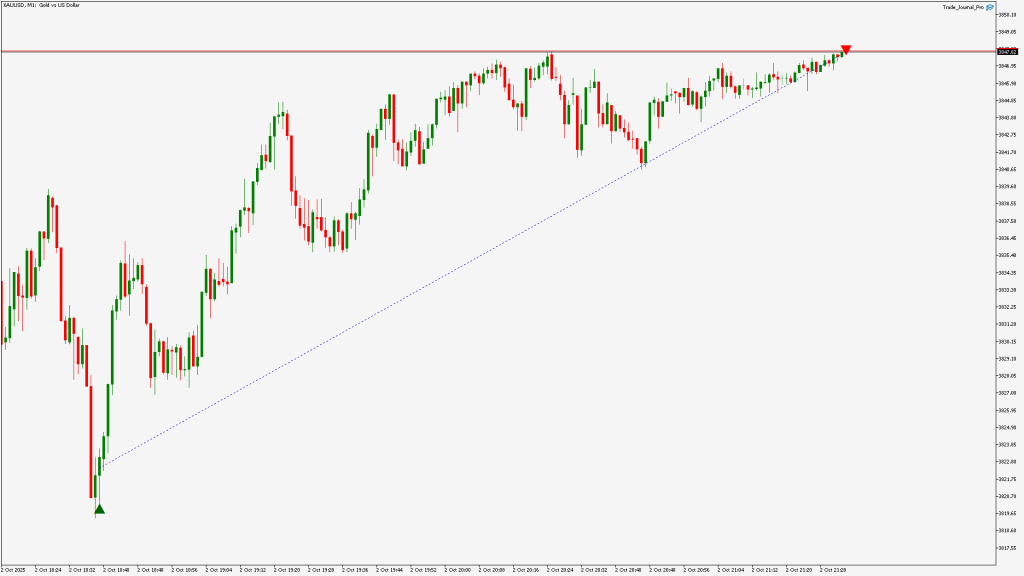
Key Features
- Automatic Trade Tracking – No more manual typing after every trade
- Entry & Exit Screenshots – See exactly what the chart looked like when you opened and closed the trade
- Detailed Trade Data Export – Export to CSV from MT4/MT5 with all key metrics
- Analyzer Software – Load the CSV into the Analyzer and get an XLSX file with:
- Performance by pair
- Performance by session/time
- Win rate, drawdown, R:R, equity curve
- Multiple sheets breaking down your trading from different angles


Pros
- Fully integrated with MT4 and MT5
- Ideal for both manual and EA traders
- Visual review via screenshots boosts learning
- Great for traders who don’t want to build complex spreadsheets
- One-time purchase (no monthly subscription)
Best For
- MT4/MT5 traders who want a set-and-forget journaling system
- Traders who want both data and visuals (screenshots)
- Traders who like to analyze detailed data in Excel-style reports
Spreadsheet-Based Trade Journals (Excel / Google Sheets)
Many traders start with Excel or Google Sheets. You can build your own journal or download free templates online.
Pros
- Free or very low cost
- Fully customizable
- Works for any market: Forex, stocks, crypto, indices, etc.
Cons
- 100% manual: you must log every trade yourself
- Easy to get lazy and skip updates
- No automatic screenshots
- Can get very complex if you want advanced stats
Best For
- Traders who enjoy working with spreadsheets
- Beginners on a zero budget
- People who only take a few trades per week
If you’re scalping or day trading with many trades per day, a manual spreadsheet will quickly become a burden.
Web-Based Forex Trade Journal Platforms
There are several online platforms that offer trading journals through a website. They usually provide:
- Online dashboard
- Charts & performance metrics
- Support for multiple brokers/platforms
Some advantages:
- Accessible from anywhere (browser-based)
- Often include tags, notes, strategy labels
- Good for visually reviewing performance
Disadvantages:
- Usually monthly or annual subscription
- Some require manual import of trading statements
- Limited flexibility if you want custom stats or layouts
These tools are solid, but if you’re focused mainly on MT4/MT5 Forex trading, a more specialized solution that integrates directly with your terminal might be more efficient.
Broker & Platform Reports
Most brokers and platforms (like MT4, MT5, cTrader) allow you to:
- Export account history
- View basic statistics
- See balance/equity curves
However:
- They are not real journals, just raw reports
- No trade comments, psychological notes, or tagging
- Limited visual or psychological tracking
- No screenshots of setups
They’re a starting point but not enough if you’re serious about optimizing your performance.
How to Choose the Right Trade Journal Tool
Here are the main questions to ask yourself:
1. Which platform do you trade on?
- MT4 / MT5 only → Trade Journal Pro EA is perfect because it’s built for those platforms.
- Multiple platforms (Forex, crypto, etc.) → You may want either:
- A web-based journal, or
- A flexible spreadsheet journal.
2. How many trades do you take?
- Scalper/day trader (many trades per day)
→ You need automation, or you’ll never keep up. - Swing/position trader (few trades per week)
→ You can get away with manual journaling if you like.
3. Do you want screenshots of your trades?
- If yes, an MT4/MT5 EA like Trade Journal Pro EA is ideal.
- Spreadsheets and web apps usually don’t capture screenshots automatically.
4. Do you enjoy working in Excel?
- If yes → a custom spreadsheet + Trade Journal Pro Analyzer is powerful.
- If no → focus on automated tools or web-based platforms.
Trade Journal Pro EA + Analyzer: Example Workflow
Here’s what a smooth journaling workflow looks like using Trade Journal Pro EA:

- You place trades on MT4 or MT5 as usual.
- The EA automatically:
- Logs the trade details
- Saves entry and exit screenshots
- After your session or week, you:
- Export the trade data to CSV
- Open Trade Journal Pro Analyzer:
- Load the CSV file
- The software analyzes all trades and generates an XLSX report
- Open the XLSX:
- Review multiple sheets:
- Overall performance
- By symbol
- By day/time
- By setup or strategy (if you add comments/tags)
- Match stats with screenshots for deeper learning
- Review multiple sheets:
This kind of workflow gives you the best of both worlds:
- Automation during trading
- Deep analysis after trading
Summary: Best Forex Trade Journal Tools in 2025
Here’s a quick comparison of the main options:
| Tool Type | Automation | Screenshots | Cost | Best For |
| Trade Journal Pro EA + Analyzer | Analyzer ✅ Yes (MT4/MT5) | ✅ Yes | One-time | MT4/MT5 traders who want full automation & deep analysis |
| Manual Excel / Google Sheets | ❌ No | ❌ No | Free/cheap | Traders who love spreadsheets and don’t mind manual work |
| Web-Based Journal Platforms | ⚠️ Partial | ❌ Rarely | Subscription | Multi-platform traders wanting a cloud solution |
| Broker / Platform Reports | ❌ No | ❌ No | Free | Basic history review only, not real journaling |
Final Thoughts: Your Trade Journal Is Your Edge
In 2025, having a proper trade journal is not optional if you want long-term success.
👉 Ready to start journaling automatically?
Check the Trade Journal Pro EA Pricing page and choose the plan that fits your trading.
You don’t need to be perfect. You just need a system that lets you:
- Record your trades
- Review your performance
- Learn from your mistakes
- Improve little by little
If you’re mainly trading on MT4 or MT5, using an automated solution like Trade Journal Pro EA with the Trade Journal Pro Analyzer can save you hours of manual work and give you powerful insights into your trading.
Start Journaling Your MT4/MT5 Trades Automatically
If you’re ready to stop guessing and start improving with real data,
try Trade Journal Pro EA for MT4 & MT5.
FAQ
Q: Do I really need a Forex trade journal?
A: If you want to improve long-term, yes. A journal shows you what works, what doesn’t, and where your biggest mistakes happen. Without data, you’re guessing.
Q: Can MT4 or MT5 journal trades automatically?
A: Not by default, but with tools like Trade Journal Pro EA, your trades can be automatically tracked with screenshots and exported for deeper analysis.
Q: Is a spreadsheet journal still useful in 2025?
A: Yes, especially if you’re a swing trader taking only a few trades per week. But for scalpers and day traders, automated journaling is usually much more efficient.